OS
OS in Rust
Announcements
- Welcome to OS in Rust
- Actual OS week.
- Action Items:
- Finish working through
split_at- Form a strong opinion on
assert - Good anecdote for job interviews.
- Form a strong opinion on
- Nominally ready for next homework after this lecture.
- Can wait for lab/section.
- Finish working through
Today
- Motivation
- Architecture
- Abstraction level
- OS
- Bus
- Address space
- Stack/heap
- Languages
Citations
- Borrowed a bit from:
Motivation
Arriving at OS
- We can arrive at OS from two ways:
- We can look at physical hardware an infer the need for a control system.
- We can look at formal descriptions of computing, such as automata, and infer the need for abstractions to practically use the system.
Architecture
The Device
- We imagine some minimal device.
- What are the minimum requirements to be a computer?
Architecture - ALU
- We imagine some minimal device.
- It contains an arithmetic/logic unit (ALU).
- Can perform e.g. logical AND, bitwise AND, and numeric ADD
- Can load/store numeric values to/from numeric addresses
- It contains an arithmetic/logic unit (ALU).
Architecture - MMU
- We imagine some minimal device.
- It contains “memory”, perhaps via a memory management unit (MMU)
- Persists numeric values associated with numeric addresses
- Physically separated from the ALU
- Geniuses will say this is key-value storage
- It contains “memory”, perhaps via a memory management unit (MMU)
Picture
Architecture
- This is the now-legendary Von Neumann architecture.

Von Neumann, Formally
- A central arithmetic unit to perform arithmetic operations;
- A central control unit to sequence operations performed by the machine;
- Memory that stores data and instructions;
- An “outside recording medium” to store input to and output from the machine;
- Input and output mechanisms to transfer data between the memory and the outside recording medium.
Competing Formulation
The competing formulation known as the Harvard architecture differed in that information describing actions (say, executables or “stored memory programs” or “instructions”) and information for read-write (say data files or just “data”) had distinct storage mediums.
- As far as I know, none of these were ever made.
- Theoretical idea.
Harvard Architecture
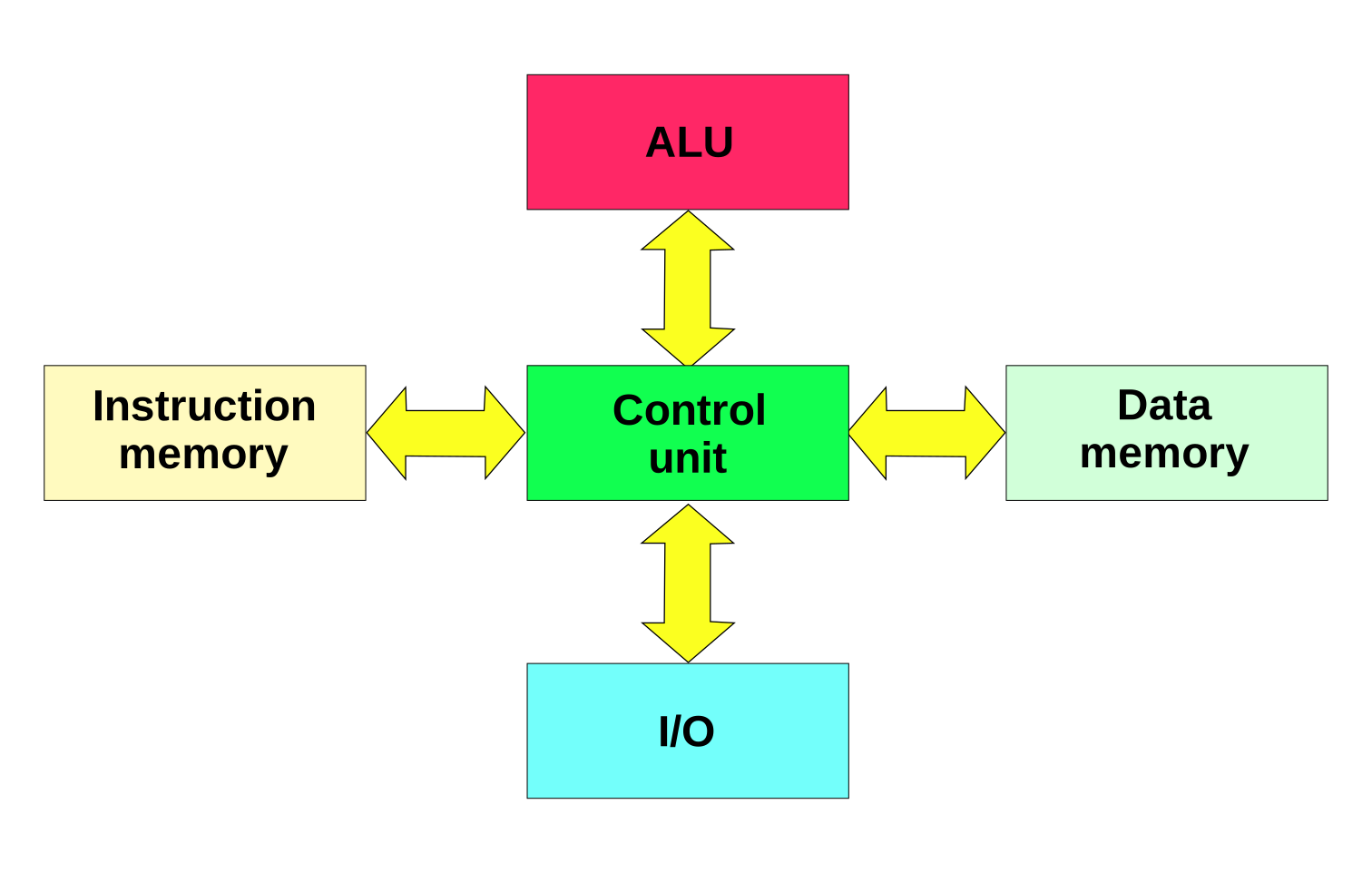
Historical use case
- Historical computing devices had no onboard storage and programs lived on e.g. external tapes.
- The Harvard architecture is a helpful model in this case.
- Today, everything lives on a SSD (OS, browser, audo/video files, debug logs, etc.)
- Hence Von Neumann
Von Neumann - Aside
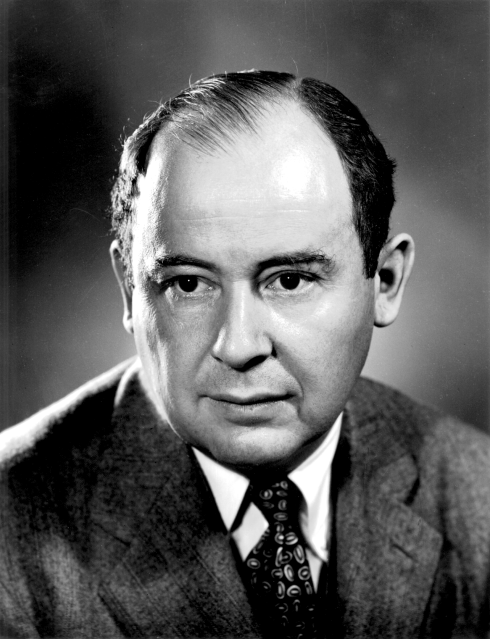
- Be advised this is a Manhattan Project member and form your own opinion about that.
Abstraction
Hardware “doesn’t matter”
- We can regard as a historical accident that hardware exists in any particular form.
- Perhaps the first computers could’ve been biological vs. mechanical vs. electric.
- We then regard the automata, principly the Turing Machine, as ground truth.
- TMs are out-of-scope for this class but probably should be a required topic in a post-Algorithms class, someday…
- Read more
Thinking about a TM

- Head can read and write
- Head is two-way
- Tape is infinite
- Infinitely many blanks(
0) follow input - Can accept/reject at any time
Vs. Hardware
- The TM assumes infinite memory
- Not a big deal, you’ll never actually use infinite memory.
- The TM makes no considerations of performance
- Tapes are slower than wires, but perhaps easier to imagine.
- The TM does not necessarily use binary
- But then again, before-Turing, neither did computers…
Say we build a TM
- Well, someone we have to model an “infinite tape” of memory.
- Perhaps by… creating a bijection to the natural numbers.
- We could then have numeric locations on the type correspond to written values (which may be numeric or linguistic)
- Wait that is the same key-value storage as the MMU.
All Roads
- …lead to a series of abstractions allowing higher-level users to use, but not implement, memory.
Different Topics
- As we layer abstractions, writing code is more efficent and running code is less efficient.
- Until mature technologies outcompete humans.
Bus
Bus
Shorter
- A bus is a bundle of wires that transfers bits.
I imagine…
- Two registers (an ordered collection of bits) are populated by some device on a bus.
- One for a numeric value.
- One for a numeric address.
I imagine…
- That device writes:
- A numerical address to bus
- All other devices listen, and see if they “own” the address
- A numerical value to the bus
- The relevant device records the bits to an internal register
- Then saves or loads or displays or whatever.
- The relevant device records the bits to an internal register
- A numerical address to bus
Within a Device
- Within devices, numerical values are separated spatially.
Within a Bus
- On the bus, the wire is either, say, “high” or “low” and these values are interpreted as “one” or “zero”.
- We term this “digital”
Signal Processing
- E.g. sine wave with some recording window.
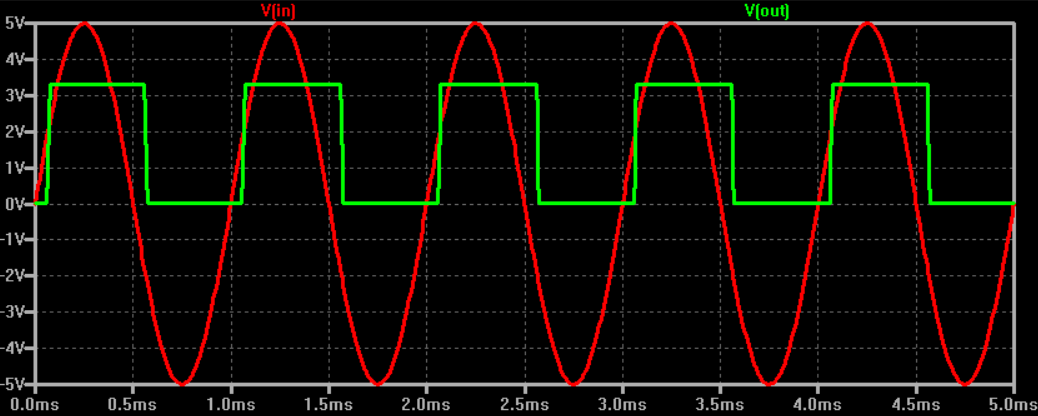
Signal Processing
- Out of scope
- Physics/Electrical Engineering topic
- Seen in Data in the Cosmos and Computer Vision
- Ludicrously radical
- We handwave it here, and only introduce so you understand what the hardware/OS has to deal with.
Address Space
Given a bus
- Say we have both a keyboard and an MMU on a bus with our ALU/CPU
- Say I input
d, ASCII 100/0x64, on my keyboard - The keyboard broadcasts onto bus
- The ALU and MMU read it
- How is the signal interpreted?
- Say I input
Throwback
- Device writes:
- A numerical address to bus
- All other devices listen, and see if they “own” the address
- A numerical value to the bus
- The relevant device records the bits to an internal register
- Then saves or loads or displays or whatever.
- The relevant device records the bits to an internal register
- A numerical address to bus
So…
- The keyboard doesn’t just blast a `0b1100100’ onto bus.
- Rather, it broadcasts some pre-determined “address” corresponding to keyboard input.
- The ALU sees this and knows to prepare a register to store the incoming value.
- The MMU sees this and knows to hit a snooze.
- So the keyboard prepends the numeric value with a numeric address.
- This is the importance of an address space.
The Big Idea
- Imagine the bus is an array.
- Each array element is some word size, say 8 (cringe), 32 (mid), 64 (based), or 128 (excessive) bits.
- Each array element has some numeric address.
For the ALU
- When the ALU wants to write to memory
- Address the MMU, either as
- A region as large as physical memory
- One address then a key-value pair
- The ALU writes a value to an address
- The MMU sees this on bus and acts accordingly
- The keyboard does whatever
- Address the MMU, either as
Wrinkles
- Sounds easy?
- We can optimize
Gaps
- Usually address space is much larger than RAM
- Addresses that can be accessed are referred to as “mapped”
- And holes that can’t be accessed are “unmapped”
- What happens if the CPU loads or stores to an unmapped region
Gaps
Permissions
- Usually as RWX
- Read
- Write
- EXecute
- The dastardly von Neumann model rears its ugly head etc.
- Why have these, and
- What if they are violated
Permissions
Multiple Devices
- Treat code and data as the same.
- Be unfathomably based.
- The keyboard is just memory.
- So is the CPU/GPU
- So is the internet (Network interface controller)
- We can execute the internet?
Multiple Devices
Further
- Physical vs. virtual address
- Usually computers can describe more memory locations than the MMU can retain.
- Caching
- Usually read/write is slow but repeated, so save common requests to deload devices and bus
- Block size
- Bits and even words are are two small, usually pages (4KB) or blocks (cloud scale)
Stack & Heap
Recall
Languages
Python
Rust
C
All of these…
- Are your problem now.
- There is also a stack (less theoretically complicated, more implementation complicated) which we have also covered.
- On to the lab/homework!
Today
- Motivation
- Architecture
- Abstraction level
- OS
- Bus
- Address space
- Stack/heap
- Languages