Text
OS in Rust
Announcements
- Action Items:
- Do you text output yet?
- The coolest assignment ever for a third week in a row.
- How do I keep getting away with it.
- Do you text output yet?
Citations
- I tried to steal this but I thought it was too bad and changed everything.
Background
VGA Text Mode
- We recall VGA text mode from the homework.
- A simple way to print text to the screen.
- We recall that Rust prints via a “macro”
- Now we:
- Create an interface to encapsulating all unsafety in a separate module.
- We also implement support for Rust’s formatting macros
The Buffer
- To print a character to the screen in VGA text mode, one has to write it to the text buffer of the VGA hardware.
- A byte passing over a bus to fixed location will render as ASCII on a screen.
1d or 2d
- The VGA text buffer renders as two-dimensional array.
- Addressed as a one dimensional array.
- Safe to assume 25 rows and 80 columns.
- Each position is an ASCII (not unicode) character.
Format
- Describes a single screen character through the following format:
| Bit(s) | Value |
|---|---|
| 0-7 | ASCII code point |
| 8-11 | Foreground color |
| 12-14 | Background color |
| 15 | Blink |
- I did not see blinking.
First Byte
- The first byte represents the character that should be printed in the [ASCII encoding].
- We recall we say many mentions of Python in firmware jobs.
Except
- Okay it isn’t actually ASCII.
- It’s code page 437
- We think of it as an IBM specific ASCII extension and just use the ASCII subset.
Second Byte
- The second byte defines how the character is displayed.
- The first four bits define the foreground color.
- The next three bits the background color
- Nominally the last bit whether the character should blink.
- I did not see blinking.
- May be a
qemuthing I’m not sure.
Colors
- Using octal.
| Number | Color | Bright | Bright Color |
|---|---|---|---|
| 0o00 | Black | 0o10 | Dark Gray |
| 0o01 | Blue | 0o11 | Light Blue |
| 0o02 | Green | 0o12 | Light Green |
| 0o03 | Cyan | 0o13 | Light Cyan |
| 0o04 | Red | 0o14 | Light Red |
| 0o05 | Magenta | 0o15 | Pink |
| 0o06 | Brown | 0o16 | Yellow |
| 0o07 | Light Gray | 0o17 | White |
Bright/Blink
- Bit 4 is the bright bit.
- For example, blue into light blue.
- For the background color, this bit is nominally repurposed as the blink bit.
Memory-mapped I/O
- Okay so this is cool.
- Recall the bus!
- We are going to steal some diagrams.
- Thanks Geeks for Geeks
Isolated I/O
- Imagine a form of I/O that isn’t cool.
- It may have separate address spaces.
- So there may be a
0x64memory location and also0x64device.
- So there may be a
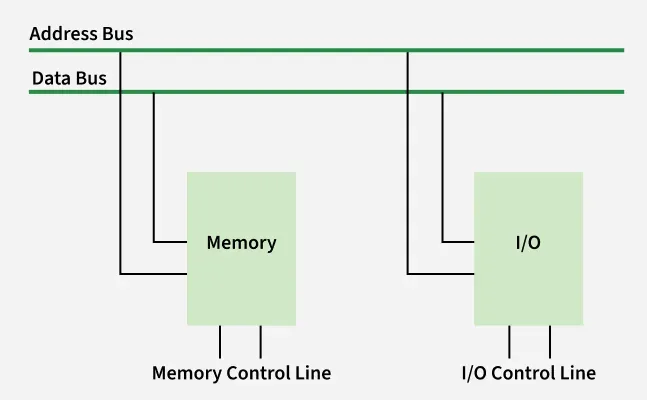
This isn’t cool
- We already discussed Harvard vs. von Neumann architecture.
- Having two memory spaces is not at all cool.
- So we don’t do it.
- There’s also port-mapped I/O (similarly not cool.
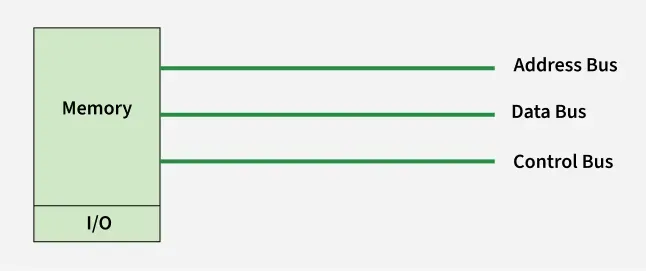
Memory-Mapped I/O
- Imagine the following.
- The bootloader lives at
0x0 - The OS lives at
0x1 - The keyboard lives at
0x2 - The internet (via a network card) at
0x3 - The monitor at
0x4
- The bootloader lives at
- This obviously cool.
Altogether
- One Big Happy Memory Space
Downsides
- MMIO is a helpful abstraction - we already know how to think about memory, so we don’t need to learn much to do I/O.
- There’s downsides.
- We shouldn’t be able to write to keyboard, probably.
- Or read from a monitor.
- But its fast and easy, like BIOS vs. UEFI.
x86_64
In x86_64
- On our emulated device, VGA text buffer lives at address
0xb8000.- Absolute geniuses will crack open C and get into trouble.
- So any read to this location:
- Doesn’t go to MMU/RAM/SSD
- Does go to VGA hardware
Alert!
- MMIO, especially older devices, might not support all normal operations.
- For example, a device could only support byte-wise reads and return junk when a
u64is read.- Block-write “Hello world!” is a homework extension.
- Read more
A Rust Module
- Now we “know” how the VGA buffer works.
- We can create a Rust module to handle print and standard out:
- We also must create a new
src/vga.rsfile.
Standard Out
- To provide “standard out” like functionality, I will:
- Maintain the most recent position to which a character has been written.
Location
- To provide “standard out” like functionality, I will:
- Maintain the most recent position to which a character has been written.
- Have a constant referring to to the VGA buffer address.
Color
- To provide “standard out” like functionality, I will:
- Provide a way to write a character.
- I will use a
constfor color and not worry about.
- I will use a
- Provide a way to write a character.
Character-wise
- To provide “standard out” like functionality, I will:
- Provide a way to write a character.
- I will write a function to push one character.
- Provide a way to write a character.
Stepwise
- Compute absolute location from relative location.
Stepwise
- Compute absolute location from relative location.
- Store a value at that location.
Stepwise
- Compute absolute location from relative location.
- Store a value at that location.
- Store a color at the next location.
Stepwise
- Compute absolute location from relative location.
- Store a value at that location.
- Store a color at the next location.
- Increment the latest.
Test it
- It is trivial to test.
- “Works on my machine!” - me
- Unless?
- We’ll come back to this.
Annoying
- Some of you may lack a strong work ethic and want to show entire a whole string rather than just a character at a time.
- Especially since using characters of a string in Rust is ludicrously opaque.
- Not to worry.
Target &str
- We can abstract to loop into
src/vga.rs
Aside
Aside
- Big Rust doesn’t want you to know you can use pointers.
src/vga.rs
- I could make this even worse but I didn’t.
- Anyways don’t do this.
Update main
- Look how nice that is!
I bet…
- I bet we can print any string.
- Let’s do like a comically easy string that will definitely print.
- There’s no way it will fail.
- It worked right?
Escape Codes
- Okay so there’s some things we need to treat differently.
- Minimally
\n. - And therefore also
\\to show a single backslash. - I don’t even know if we need anything else, but I’ll show the design pattern.
- Minimally
Revisit Implementation
- Recall our naive implementation.
Case analysis
- As far as I know (I didn’t check) we only have to look for is:
\n10(I think?)0xa
- It will be a
u8within the loop (since weas_bytesfirst)
Trust but verify
- I just checked in a different crate.
- Looked like 10 to me.
Now it works!
- We can write vertically!
- I guess this could be a helper function or something.
Good thing…
- I can print that more than once!
- Wait a minute!
We’re doomed
- We didn’t save what was written to the previous lines.
- Real ones know.

Unless?
- No way can we read from the VGA text buffer right.
- That would be… extraordinary.
- You can do whatever you want, I just want to show you one possible design choice.
- Mostly as a proof of concept.
Scroll
- I’ll add some
consts and write a helper.
Execution
- Start at the first character that will remain visible.
- Copy it to the earliest visible slot (start of buffer).
- Iterate until the full buffer is moved.
- We note this could be executed in a single
memmove
My Code
- Public just to test.
My Test
- I just sent line numbers then manually scrolled.
A better test
- Here is a copy of the Project Gutenburg ebook of Pride and Prejudice.
- It contains some quotes which might be a problem.
- Link
Does it work?
- What do we have to do?
- Add
scrolltostr_to_vga - Update
LATESTinscroll - Blank out the last line, I used space (
0x20or32) - Make sure all color bytes are set.
Why do we blank out?
- Recall we are writing to MMIO.
- As soon as we exceed the MMIO range, we can make no claims about what memory we are vviewing.
- So if we copy in data past the buffer, we could get anything.
- So if we don’t overwrite the buffer, we could get anything.
We set color bytes?
- Like lines off the MMIO range, the color bytes have no known value.
- So if we e.g. have a newline anywhere and end up not initially setting colors…
- Then copy text up to that line…
- We will be showing text in an unset color.
- Just whatever bits happened to be there!
This is unsafe!
- Astute learners will notice this is all very unsafe.
I’m loopy
- I should not I do everything with
forloops and “single-equals-assignment”- I mostly am teaching you how to code
- This is NOT teaching you how to Rust (or C)
- Who needs
memmove(a C function) when we have the humbleforloop. - Read more: core::ptr::copy
Caution!
- I am building my crate without access to
memmove. - You may need to go back and add some configuration.
- This was covered in the “Kernel” lecture.
My solution
src/vga.rs
const ROWS: usize = 80;
const COLS: usize = 25;
const MAX: usize = ROWS * COLS;

fn scroll() {
    unsafe {
        for i in 80..MAX {
            let src: *mut u8 = (MMIO + i * 2) as *mut u8;
            let dst: *mut u8 = (MMIO + (i - 80) * 2)) as *mut u8;
            *dst = *src;
            *((dst as usize + 1) as *mut u8) = COLOR;
        }
        for i in (MAX-80)..MAX {
            let dst: *mut u8 = (MMIO + i * 2) as *mut u8;
            *dst = 32;
            *((dst as usize + 1) as *mut u8) = COLOR;
        }
        LATEST = LATEST - 80;
    }
}

pub fn str_to_vga(s: &str) {
    let v = s.as_bytes();
    unsafe {
        for i in 0..v.len() {
            if LATEST > MAX {
                scroll();
            }
            match v[i] {
                10 => LATEST = ((LATEST / 80) + 1) * 80,
                _ => char_to_vga(v[i]),
            }
        }
    }
}
Volatile
Best Practice
- This works on my machine.
- It may not always work.
- Why?
rustcis a bit too smart.- There is no obvious externally observable reason to write to fixed memory location.
- The compiler may optimize out such writes.
- I say “sure it will.”
Quote Blog
The problem is that we only write to the buffer and never read from it again.
- Okay so but here me out.
- Our implementation does read from the buffer again.
- Sometimes the best way to do things is also the simplest.
- For some reason blog kept a local copy and only used that?
Volatile
Interested Students
- There’s a
read_volatileandwrite_volatileinstd::ptrand another incore::ptr, we might be able to use those.